The Problem
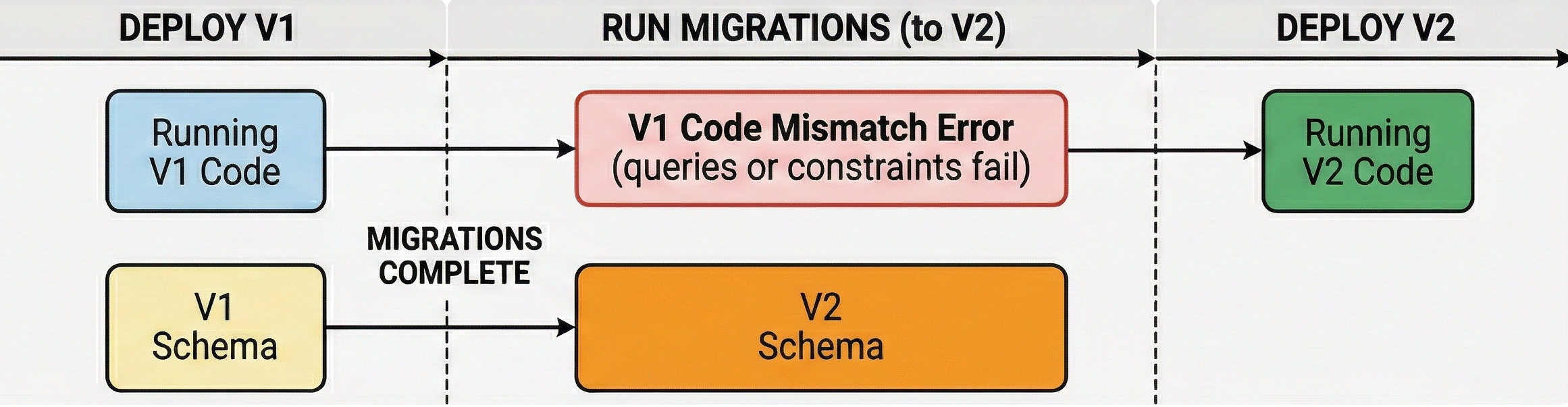
When you remove a field from a Django model, there’s a dangerous gap during deployment: the migration runs first (dropping the column), but old code pods are still running that expect the field to exist. This causes ProgrammingError: column X does not exist. Even if this gap is small, only a few seconds, that is enough time for requests to fail and customers to get a 500 error page.
The Solution: Two-Phase SeparateDatabaseAndState
Phase 1: Remove from Django, Keep in Database
Migration:
class Migration(migrations.Migration):
    operations = [
        migrations.SeparateDatabaseAndState(
            state_operations=[
                migrations.RemoveField(
                    model_name='mymodel',
                    name='field_to_remove',
                ),
            ],
            database_operations=[
                # Empty - don't touch database yet
            ],
        ),
    ]
Model:
class MyModel(models.Model):
    # field_to_remove = models.CharField(...) - REMOVED
    other_field = models.CharField(...)
Deploy this. Django stops querying the field, but it still exists in the database (harmless).
Phase 2: Drop the Database Column
Migration:
class Migration(migrations.Migration):
    operations = [
        migrations.RunSQL(
            sql="ALTER TABLE myapp_mymodel DROP COLUMN field_to_remove;",
            reverse_sql="ALTER TABLE myapp_mymodel ADD COLUMN field_to_remove VARCHAR(100);"
        )
    ]
Deploy this to clean up the unused column.
Why This Works
- Phase 1: Django’s ORM stops selecting the field, so no code errors when the column eventually disappears
- Phase 2: Safe to drop the column because no code references it anymore
- No gap: There’s never a mismatch between what Django expects and what exists in the database
One more gotcha
In order for Phase 1 to work, the field in the database must be nullable or have a default value configured in the DB (you have to use db_default in Django to set this). Without this any inserts into the table from between Phase 1 and Phase 2 will result in an error.